Step 1. Test a different new router and SSID outside your organization.
Step 2. Use your phone as a hotspot.
Step 3. Contact the Cloud Poster Support team with a screenshot of the ePaper Tool App or a video demonstrating your operation process.
Note 1: Certain organizations implement security policies and protective measures on their Wi-Fi.
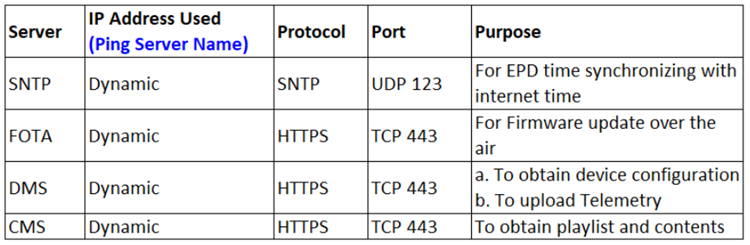
Note 2: For internet-related issues, please consult the internet settings table for guidance.
Was this article helpful?
That’s Great!
Thank you for your feedback
Sorry! We couldn't be helpful
Thank you for your feedback
Feedback sent
We appreciate your effort and will try to fix the article